
Google Business Profile is the most powerful free tool for acquiring local customers. Unfortunately, many companies – instead of utilizing its potential – voluntarily lower their position in search results, and worse, scare away potential customers.
Here is a summary of the most common mistakes made when configuring and managing a Google Business Profile. Make sure your company isn’t making them!
1. Keyword Stuffing in the Name
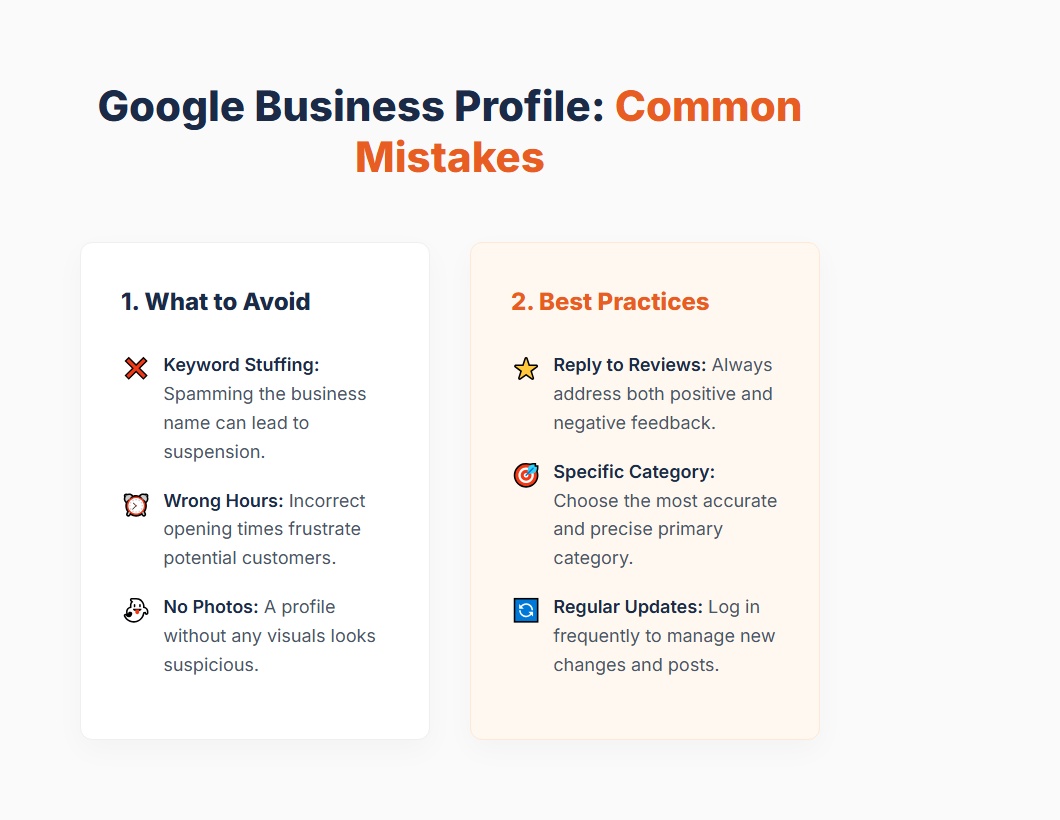
This is a mistake that can cost you a profile suspension! Many entrepreneurs believe that if they add their services and city to the company name, they will rank higher. Instead of “Kowalczyk Sp. z o.o.”, they enter: “Best Cheap Plumber Kowalczyk Pipe Repair Poznan 24/7”.
Why is this a mistake? Google’s guidelines are merciless: the name on your profile must reflect the real name under which your company operates in the real world (e.g., on a signboard or in documents). When a competitor reports your profile for keyword abuse, Google can hide your listing.
2. Empty (or Incorrect) Opening Hours
Missing opening hours is frustrating for a customer, but providing incorrect hours is a reason for fury. Imagine driving to the other end of the city on Friday at 5:30 PM, seeing “Open until 6:00 PM” on Google, only to kiss the doorknob.
What to do about it? Always update your working hours when they change. Particularly important are the so-called custom hours – on holidays, long weekends, or inventory days.
3. Wrong or Too Broad Primary Category
Google categorizes businesses to show users the most relevant results. If you are a divorce lawyer and your primary category is simply “Lawyer” (or worse, “Company”), you lose the battle for customers searching for “divorce lawyer Poznan” to someone who precisely chose the “Family Law Attorney” category.
What to do about it? The primary category is the most important ranking signal. Choose the most specific one that perfectly describes the main pillar of your business.
4. Ignoring Customer Reviews (Especially Negative Ones)
This is a double mistake. Not replying to positive reviews is a missed opportunity to build relationships. Meanwhile, ignoring negative reviews (or replying to them with vulgarity and emotion) is marketing suicide.
What to do about it? Customers reading negative reviews look primarily at how the business owner solves the problem. A professional, calm response and a request to contact to clarify the matter often works better than a profile full of “fake” 5-star ratings.
5. Phantom Profile (No Photos)
A profile without a logo, without an exterior photo, and without photos of completed projects looks… suspicious. A customer seeks credibility, and the lack of any visuals suggests that the company may no longer exist or doesn’t care about its image.
What to do about it? Even if you run an accounting office (where spectacular projects are hard to come by), add a photo of the building, logo, and a smiling team at work. Companies with photos generate several dozen percent more inquiries!
6. Leaving the Profile to Itself
A Business Profile isn’t a page in a 90s phone book. Google is constantly introducing new features, and users ask questions (the “Questions and Answers” section). What’s more, every Google user (including your competition!) can suggest changes to your data, e.g., changing the phone number or marking the company as “permanently closed”.
What to do about it? Once a week or every two weeks, log in to your Google My Business dashboard. Check for any suggested changes, respond to reviews, upload a new photo, or publish a short post about a promotion.
Summary
Optimizing your profile is a game of building trust – both in the eyes of customers and search engine algorithms. Eliminating these basic mistakes is the first step to stop losing traffic and start fully utilizing the potential of local SEO.