
Have you ever wondered what a customer sees when they type the name of your business or the phrase “my business” into a search engine? Nowadays, your website is not the first point of contact with your brand. It’s the Google Business Profile (formerly Google My Business).
If you run a local business – a hair salon, a car repair shop, an accounting office, or a restaurant – a well-optimized Google Maps profile is the absolute foundation of marketing. It is the most powerful, and on top of that, completely free tool for acquiring customers from the immediate area. In this article, you will learn how to maximize its potential.
What is Google My Business and why do you need it?
A Google Business Profile is a kind of virtual notice board that appears on the right side in search results on desktop computers or at the very top in the Google Maps app on mobile phones. It contains key information: address, phone number, opening hours, a link to the website, and most importantly – customer reviews.
Why should the phrase “my business in Google” be your priority? Because over 70% of users looking for local services use maps. What’s more, “service near me” queries (e.g., “dentist near me”) are seeing massive year-over-year growth. If you don’t have a profile or it’s incomplete, you are voluntarily giving away these customers to competitors located just a street away.
How to set up your business profile on Google?
The process is simple but requires confirming that you actually own the business in question.
- Log in to your Google account.
- Go to
google.com/businessand click “Manage now”. - Enter the name of your business. If it already exists in the system (someone else might have added it earlier), you will be able to request ownership (so-called claiming a profile).
- Choose the primary category of your business.
- Indicate whether you have a physical location that customers can visit (e.g., a store) or if you provide mobile services.
- Verification: Google must confirm authenticity. Most often, this is done by sending a postcard with a code to the company address (takes up to 14 days), an SMS, a video recording, or a phone call.
After entering the verification pin, your “my business” in Google officially becomes visible to the world. But that’s just the beginning!
Profile optimization – how to rank higher than the competition?
Simply setting up a profile won’t magically land you in the first place. Rankings are determined by the local search algorithm (so-called Local SEO). To beat your competitors, you must take care of every detail of your profile.
1. NAP (Name, Address, Phone)
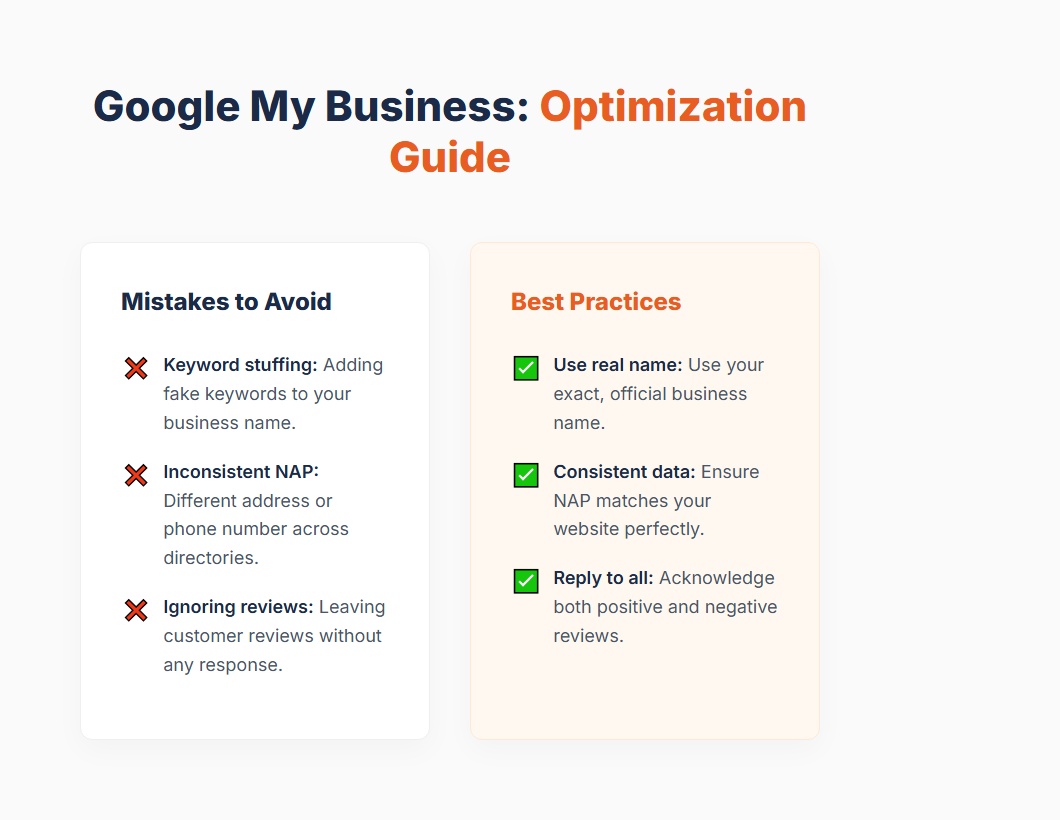
These three elements are sacred. Your company name, address, and phone number must be 100% consistent with the details on your website and elsewhere on the web (e.g., in business directories). If Google notices discrepancies, it will consider your business less credible. The name in your profile should be your official name – avoid stuffing keywords into the title (e.g., “John Doe – Best Cheap Plumber 24h”), as this can lead to a profile suspension!
2. Category selection and descriptions
The primary category has a colossal impact on what queries you will appear for. Choose the most precise one. Furthermore, fill out the “Business description” (you have 750 characters at your disposal). Naturally weave in phrases that customers might use (e.g., names of key services and city/neighborhood).
3. Opening hours – don’t mislead!
There is nothing worse for a customer than driving to a specified address only to find the door locked. Remember to update your opening hours regularly – especially during national holidays and long weekends. Google sends reminders asking “Is your business open this holiday?” – always answer them.
Google reviews – the currency of the 21st century
When you type “my business”, the first thing that catches your eye are the yellow stars. This is so-called “social proof”. Consumer research indicates that 88% of internet users trust online reviews as much as personal recommendations from friends.
How to get reviews?
Don’t buy them on auctions! The algorithm can quickly detect fake reviews, and your profile may be penalized. Instead – ask for them naturally. You can do this by:
– sending an SMS after a successful visit with a link for a review,
– QR codes on the counter or business cards,
– weaving the request into the email template ending the collaboration.
Rule number one: Respond to all reviews! Both positive (thank them for their time spent leaving a review) and negative. When a “one-star” review appears, don’t get into a squabble. Keep it classy, apologize for the inconvenience, and propose contact outside the platform to clarify the matter. This is a signal to other readers that you take customers seriously and resolve problems professionally.
Treat your profile like a mini-website
Google provides a range of features that allow you to bring your profile to life. Companies that use them win because they signal the algorithm: “our profile is active and maintained”.
- Photos: Add a company logo and a high-quality cover photo. Furthermore, regularly add new photos of projects, office interiors, or products. Profiles with photos generate 35% more clicks to the website.
- Posts: Similar to Facebook, you can publish “Posts”. Inform about current promotions, events, or new blog posts there.
- Q&A Section: Google allows users to ask questions directly in the profile. Anticipate them – ask the 5 most common questions your customers have and answer them yourself! This way, you will create a useful knowledge base.
Summary
The query “my business” in the search panel or typing its name by a potential customer is a moment of truth. A well-optimized Google My Business profile is the best and cheapest marketing employee – it works for you 24 hours a day, collects leads, and sells your credibility before the customer even picks up the phone.
If you put off setting it up “for later”, you can be sure that your competition is currently collecting five-star reviews from their customers. Start today – verify your profile, upload photos of your work, ask your last three satisfied customers for a review, and watch your business grow on Google Maps.